
📐 Height Ruler Tool
Visualize and audit the character's variable virtual dimensions in real time during animation playback.
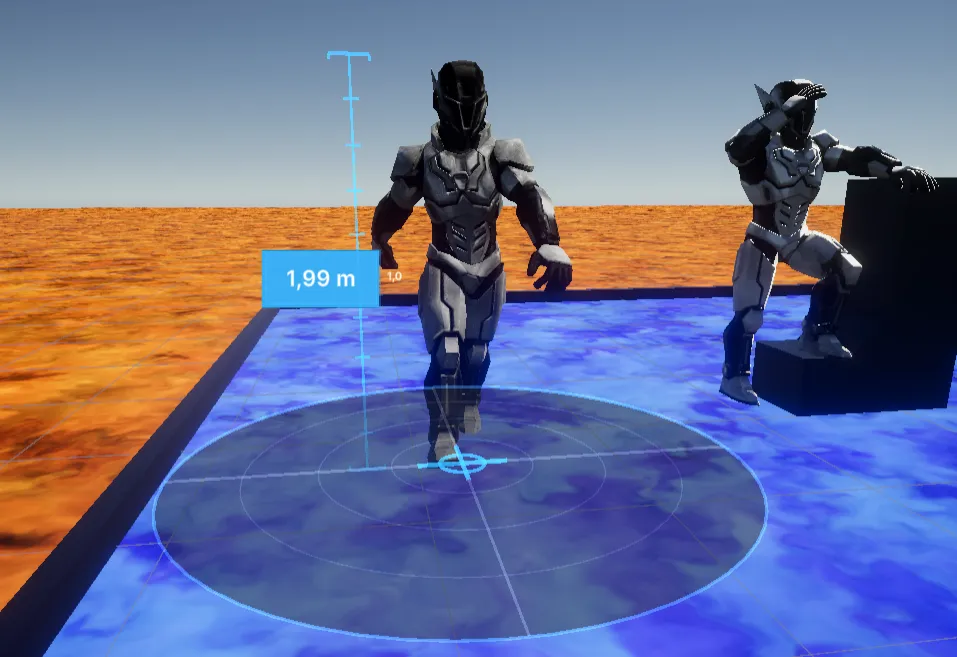
Keeping scale consistent is one of the most critical points in development to prevent avatars from interacting disproportionately with colliders and scene objects. Height Ruler Tool provides live and configurable metric markers next to or in front of your model, adapting to current frame posture changes like squash and stretch.
Key setup and specifications
Section titled “Key setup and specifications”1. Unit system and quick adjustment
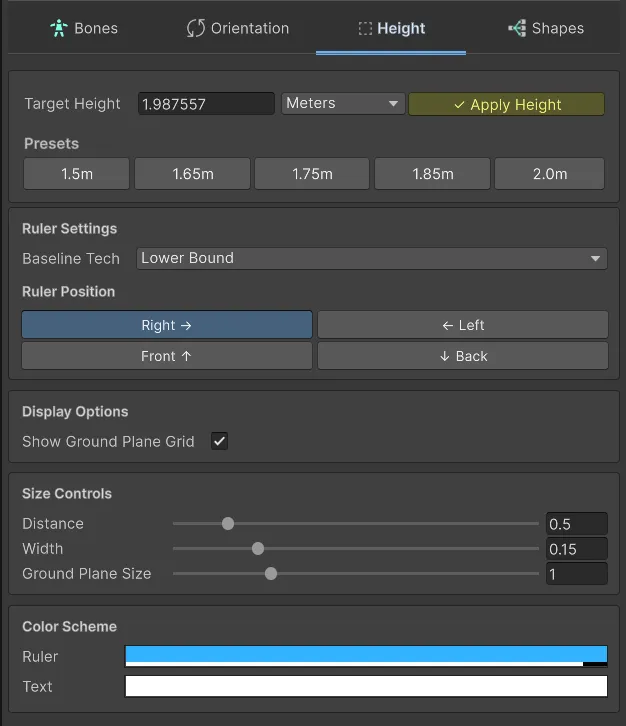
Section titled “1. Unit system and quick adjustment”No more mental conversion. The tool displays virtual height in Meters, Centimeters, Feet, or Inches.
- Target Height: Enter a target value and click Apply Height to automatically scale the character to that exact height.
- Height presets: Fast buttons for common heights (1.50m to 2.0m), ideal to standardize characters quickly.
2. Ruler baseline method
Section titled “2. Ruler baseline method”Define how character base is measured:
- Lower Bound: Zero point is the lower bounds limit (useful to detect true ground contact).
- Pivot: Zero point stays fixed at object pivot/root, ignoring lower anatomical deviations.
3. Technical visualization and customization
Section titled “3. Technical visualization and customization”- Ruler Position: Place the ruler at any side (Right, Left, Front, Back) to avoid obstructing model view.
- Ground Plane Visualizer: Projects an interactive grid disk under the character for spatial context and visual stability.
- Color scheme: Customize ruler and floating text colors for readability over any background or character texture.
- Size controls: Adjust offset (distance to model) and ruler width based on your visualization needs.